

SkyTrak
SkyTrak Net Return Fiberbuilt Studio Golf Simulator Package
SkyTrak Net Return Fiberbuilt Studio Golf Simulator Package
View full product details
Couldn't load pickup availability
Free Shipping
Free Shipping
At InTheHoleGolf.com we've taken the guess work out of shipping charges by offering Free Shipping on Orders Over $75. This Free Shipping promotion is only available for orders shipped within the Continental US (Also Know as the Contiguous US or Lower 48). To qualify for free shipping simply ensure that the total of your items in your shopping cart is over $75 and you'll qualify for Free Ground Shipping. Generally this shipping method will be UPS or FedEx Ground. Deliveries times are usually 2-7 business days. We reserve the right to ship your order via US Mail if we determine that it will be more efficient. Some over sized items may incur an over sized shipping charge. These over sized shipping charges will be displayed on the checkout page. Please inquire for freight charges to AK, HI, Canada, and International orders.
If you have any questions regarding any of our shipping policies, feel free to call us, 1-888-733-8383.
InTheHoleGolf.com
P.O. Box 11471
Jackson, WY 83002
Hours: 9am-5pm MST, Mon.-Fri.
Toll Free: 1-888-733-8383
Ph: 1-307-734-8062
Fax: 1-307-732-0339
Email: customerservice@intheholegolf.com
Satisfaction Guarantee
Satisfaction Guarantee
At InTheHoleGolf.com we want you to be completely satisfied with your purchase. With our 100% Satisfaction Guarantee it is our goal to make purchasing your golf products at InTheHoleGolf.com completely risk free. Your purchase is covered by our full 100% Guarantee:
60 Day Money Back Guarantee
60 Day Playability Guarantee
60 Day Exchange Policy
We offer a "no questions asked" 60 Day Money Back Guarantee. This 60 day period starts when you receive your order. If within this 60 day period, you are not completely satisfied with your purchase, simply contact us for a Return Authorization.
We realize you need to test your golf equipment in order to determine if it works for you, therefore our guarantee is a Playability Guarantee. Try your new golf product for 60 days and if it does not meet your expectations, simply contact us for a Return Authorization. We understand the product will be used and may show some wear, but we reserve the right to refuse a return that has been abused, damaged, or significantly altered.
We also offer a 60 Day Exchange Policy. If within this 60 day period, you are not completely satisfied with your purchase and would like to exchange it for something else, simply contact us for a Return Authorization.
*Please Note: Custom clubs, Tour Links putting greens, pre-owned equipment, and the ES16 Tour is non-returnable, and is excluded from our playability guarantee. The return period for SkyTrak is 30 Days. All sales on pre-owned and custom clubs are final. Ewheels mobility scooters are non-returnable. Shoes may be tried on indoors to see if the fit is correct. We will gladly accept returns and exchanges on shoes as long as they do not show use or wear from being worn outdoors.
All returns or exchanges must be accompanied by a Return Authorization. All return shipping charges are the responsibility of the customer. Refunds will be issued for the purchase price of the product.
Please call or email us for your Return Authorization before sending anything back to us. If you have any questions regarding this policy, please feel free to call us Toll Free at 1-888-733-8383 and we will be happy to help you.
InTheHoleGolf.com
Mailing Address:(US Mail)
In The Hole! Golf, Inc.
P.O. Box 11471
Jackson, WY 83002
Shipping Address:(UPS or FedEx)
In The Hole Golf, Inc.
1745 High School Rd., Suite 510
Jackson, WY 83002
Price Matching
Price Matching
At InTheHoleGolf.com we've taken the guess work out of shipping charges by offering Free Shipping on Orders Over $75. This Free Shipping promotion is only available for orders shipped within the Continental US (Also Know as the Contiguous US or Lower 48). To qualify for free shipping simply ensure that the total of your items in your shopping cart is over $75 and you'll qualify for Free Ground Shipping. Generally this shipping method will be UPS or FedEx Ground. Deliveries times are usually 2-7 business days. We reserve the right to ship your order via US Mail if we determine that it will be more efficient.
We strive to have the best prices on the internet, for all of the products in our store. We scour the internet daily, so that you don't have to. If you find an identical product, in stock, at a lower price from another authorized dealer, we will do our best to match the price. Please note, some competitors may hide additional charges in handling or shipping fees, we therefore will match the final delivered prices. Please call or email us with the details on the product and where you have seen the lower price.
We make every effort to provide the most accurate information on our website, and to avoid errors in pricing, product information, and shipping. However, if a a mistake is found on our website, we reserve the right to correct it. Thank you for your understanding, we apologize for any inconvenience this may cause.
If you have any questions regarding any of our Price Matching Policy, feel free to call us, 1-888-733-8383.
InTheHoleGolf.com
P.O. Box 11471
Jackson, WY 83002
Hours: 9am-5pm MST, Mon.-Fri.
Toll Free: 1-888-733-8383
Ph: 1-307-734-8062
Fax: 1-307-732-0339
Privacy & Security
Privacy & Security
At InTheHoleGolf.com, we respect the privacy of our customers. We collect only the information that is necessary to process your order and notify you of any changes to your order. Your information is never shared, sold, rented, leased or given to any third parties. To view our complete Privacy Policy.
Security
We strive to ensure that shopping online at InTheHoleGolf.com is more secure than using your credit card at a local retailer. InTheHoleGolf.com uses latest 256 Bit Secure Sockets Layering (SSL) technology to encrypt your personal information, before it travels over the Internet. SSL technology is the industry standard for secure online transactions. Because we use SSL, placing an order online is just as safe as giving your credit card number over the telephone. Consumer protection laws protect you against any unauthorized use of your credit card. Federal law dictates that your legal liability is limited to $50 if your credit card number is used without your permission. If you suspect any illegal use of your card, call your issuing bank immediately to make sure your rights are protected.
If you have any questions regarding our Privacy & Security Policies, feel free to call us, 1-888-733-8383.
InTheHoleGolf.com
P.O. Box 11471
Jackson, WY 83002
Hours: 9am-5pm MST, Mon.-Fri.
Toll Free: 1-888-733-8383
Ph: 1-307-734-8062
Fax: 1-307-732-0339
Email: customerservice@intheholegolf.com

Product details
Description
The first personal launch monitor of its kind, SkyTrak is a realistic and real-time golf practice and play system. SkyTrak connects wirelessly to your iPad Air, then accurately captures and displays launch data and ball flight as soon as you hit the ball. You�ll see the ball fly and receive instant feedback on every shot.
SkyTrak utilizes the same technology found in other commercial launch monitors but at an affordable price, making it available to more fitters, teachers, and college programs. The key here is ACCURACY. SkyTrak provides REAL launch data that helps you find the right club, the right swing, and know your game inside and out.
SkyTrak Software Packages
Par Package Includes:
SkyTrak Launch Monitor
Birdie Package Includes:
SkyTrak Launch Monitor
SkyTrak Protective Case - Metal
Eagle Includes:
SkyTrak Launch Monitor
Game & Improve Software Package
SkyTrak Protective Case - Metal
Double Eagle Includes:
SkyTrak Launch Monitor
WGT Play & Improve Software Package
SkyTrak Protective Case - Metal
Net Return Packages:
The Net Return Home Series - Includes Side Barriers
The Net Return Pro Series - Includes Side Barriers
Fiberbuilt Packages:
Fiberbuilt Studio Series Single 4'x7'
Fiberbuilt Studio Series Center Hitting 4'x9'
Fiberbuilt Studio Series Center Stance 4'x10'

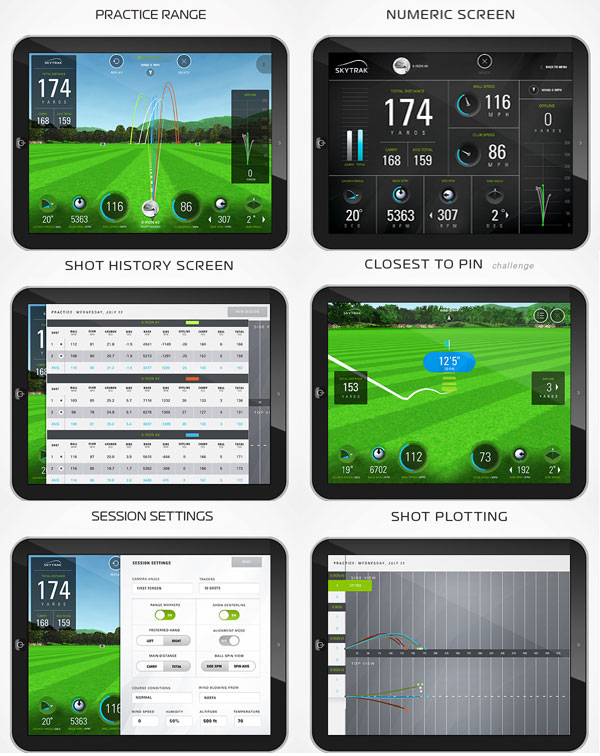
Practice with SkyTrak
SkyTrak is a revolutionary development in launch monitor technology. It�s a small package with a lot of power. Here are some of the advanced features you�ll find in SkyTrak. We think you�ll agree, it�s in a class of its own.
* Photometric Launch Monitor
* Completely Wireless Design
* iPad Compatible
* PC Compatible
* Professional-Grade Accuracy
Robust Set of Measured Parameters
* Ball Speed
* Launch Angle
* Back Spin
* Side Spin
* Side Angle
* Spin Axis
* Total Spin
Features: SkyTrak Golf Launch Monitor
Affordable
Practice at home and save on trips to the range with the knowledge that you are getting the accuracy and power of a high-end system at a fraction of the cost.
Portable
SkyTrak goes where you go. Whether you are at home or on the range, simply connect to your iPad with SkyTrak�s built-in Wi-Fi.
Entertaining
SkyTrak makes practice fun with skill-building games and challenges. Compete against your friends while you sharpen your skills.
Accurate
SkyTrak uses high-speed photography to measure the golf ball and provide you with an accurate reading of your ball speed, launch angle, and spin.
What's Included:
� SkyTrak Launch Monitor
� USB Cable
� User Guide
� Software (via download)
What Accessories Are Necessary To Use the SkyTrack:
� If hitting inside, you will need a hitting mat and net.
� You will need to use an iPad Air, iPad Air 2, iPad Mini 2 (with Retina Display), iPad Mini 3, or newer models


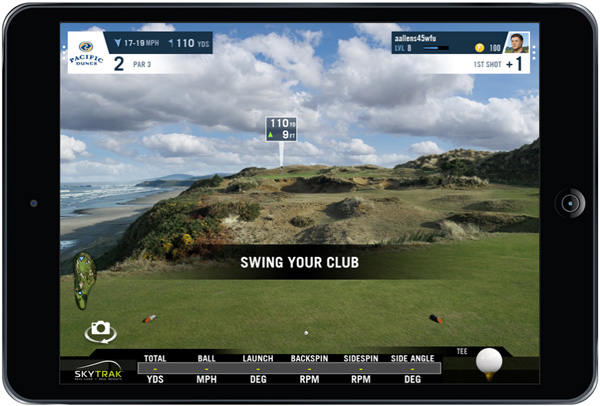
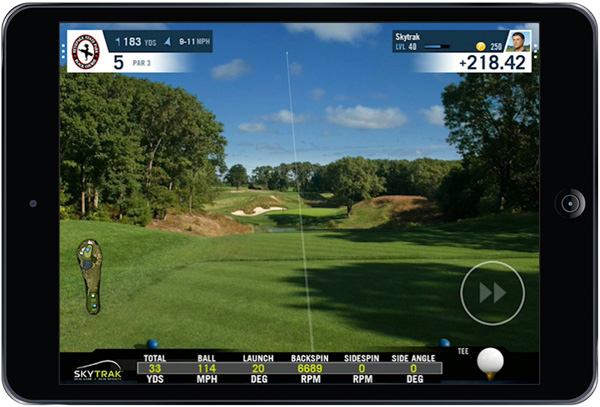
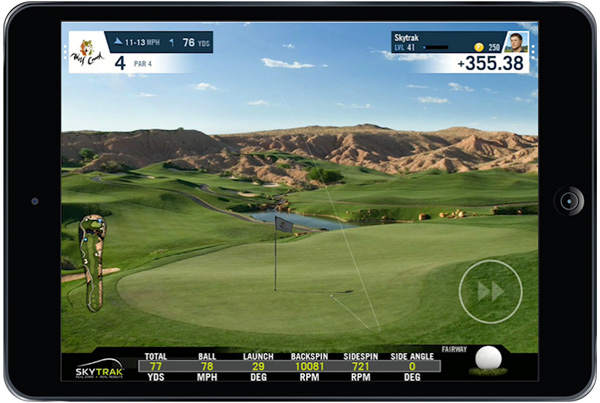
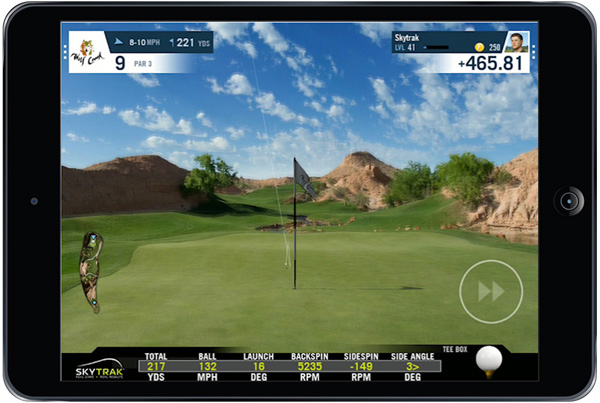
What if you could use the SkyTrak Launch Monitor to play some of the world�s top courses on WGT Golf? SkyTrak and WGT are excited to offer golfers everywhere the freedom to play famous, championship courses with their own clubs in a stunning, high-definition virtual environment.
Join the over 10 million golfers worldwide playing WGT Golf.
Play Golf on Realistic HD Courses With SkyTrak and WGT Golf!
Swing away with SkyTrak to play famous 18-hole courses on WGT Golf
with your own clubs and own balls at your own pace virtually anywhere!
Frequently Asked Questions
Can I use it anywhere, indoor and outdoor?
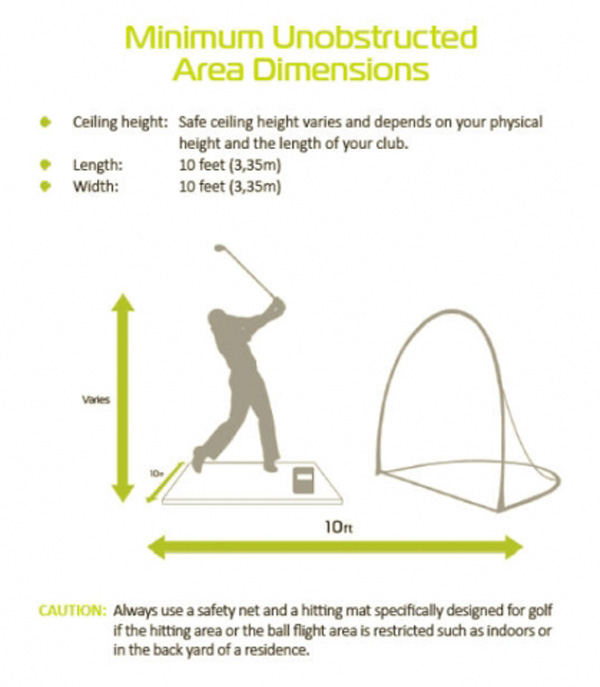
As long as there is enough room to safely swing a golf club, you have enough room to use the SkyTrak system. Suggested indoor dimensions are a minimum of 10� wide x 10� deep with a variable height, depending on your physical height and length of your club. (See the diagram below)
SkyTrak is completely portable and can be used both indoors and outdoors on a mat. If you�re using the SkyTrak system indoors, then you�ll need to use a hitting net. The SkyTrak Launch Monitor has an internal battery providing over 4 hours of use when fully charged and wirelessly connects to your iPad. Outdoor performance may vary in certain lighting conditions. Avoid the sun shining or reflecting directly into the lens of the SkyTrak device.
You should use new, or relatively new, quality distance, performance, or Tour type golf balls in good clean condition. The type and condition of the ball you use will affect ball flight data, most noticeably ball speed and spin. Ball imperfections, mud, excessive markings, cut covers, and/or otherwise identifiable markings on the ball, etc. can affect SkyTrak�s dimple recognition capability, making ball data difficult to analyze.
Can I use SkyTrak with any tablet or computer?
IOS Compatibility
SkyTrak requires 3D graphics support. The following Apple� products have passed compatibility testing:
iPad Air
iPad Air 2
iPad Mini 2 (with Retina Display)
iPad Mini 3
iPad Mini 4
iPad Pro
ANDROID Compatibility
The following Android devices have been tested in-house and are officially approved for use with SkyTrak. In general, we have seen best results with newer Android devices containing Octa-core (or dual quad-core) processors. We will continue to test more devices and will update this list accordingly:
Google Pixel C
Samsung Galaxy Tab S3
Samsung Galaxy S6
Samsung Galaxy Tab S2
Samsung Galaxy S8
PC Compatibility
The SkyTrak software, including drivers, is available for PC only. You must have a PC with an Intel Core 2 Duo / 2.0 GHz processor or higher, 2GB of RAM or higher, and Microsoft Windows 7, 8, or 10 installed. You can download the SkyTrak PC software from the SkyTrak Download webpage. Third-party golf simulation PC software requirements vary by provider. Please visit the "Simulation" webpages for more information.
Customer reviews
Questions before you buy? Talk with a golf expert at 1-888-733-8383.